Launching MoonPay Enterprise: Stablecoin APIs for developers → Learn More

MoonPay
  • Individuals
  • Business
  • Language
  • Get Started
Buy
Buy cryptoUse a card, Apple Pay or Google Pay to buy crypto fast. We also accept bank transfers and wires.
Buy BitcoinBTC
Buy EthereumETH
Buy PolygonPOL
Buy SolanaSOL
Buy DogecoinDOGE
Buy CardanoADA
Buy AvalancheAVAX
Sell
Sell cryptoTurn your crypto into cash. In a flash. Get paid straight to your bank account or Visa card.
Sell BitcoinBTC
Sell EthereumETH
Sell USDCUSDC
Sell SolanaSOL
Sell CardanoADA
Sell DogecoinDOGE
Sell AvalancheAVAX
Trade
Trade cryptoTrade between tokens, even if they’re on different chains (we make bridging seamless too).
Trade EthereumETH
Trade USDCUSDC
Trade AaveAAVE
Trade ChainlinkLINK
Trade Wrapped BitcoinWBTC
Trade DaiDAI
Trade CompoundCOMP
Company
NewsroomNewsroomMediaMediaCareersCareersChangelogChangelogMoonPay DiscoverMoonPay DiscoverNew
Crypto Prices
Bitcoin PriceEthereum PriceSolana PriceDogecoin PriceCardano PriceXRP PriceBNB PriceAll Crypto Prices
Learn
What is Blockchain?What is Blockchain?What are NFTs?What are NFTs?What is Bitcoin mining?What is Bitcoin mining?What is DeFi?What is DeFi?What is crypto staking?What is crypto staking?All Learn Articles
Support
DocumentationDocumentationHelp CenterHelp CenterContact UsContact UsStatusStatus
  • Language
  • All rights reserved. MoonPay USA LLC is a registered money service business (NMLS ID: 2071245). For Law Enforcement requests please direct your official document to our compliance team here.

    English (Canada)
    • Personal
    • Buy Crypto
    • Sell Crypto
    • Trade Crypto
    • Learn about Crypto
    • Crypto Price
    • MoonAgentsNew!
    • Business
    • Ramps
    • Virtual AccountsNew!
    • MoonPay Discover
    • MoonPay Commerce
    • MoonPay InstitutionalNew!
    • Company
    • About Us
    • CareersWe're hiring
    • Newsroom
    • Media
    • Changelog
    • Support
    • API Docs
    • Help Center
    • Contact Us
    • Status
    • Security
    • Buy
    • Buy Bitcoin
    • Buy Ethereum
    • Buy Solana
    • Buy Cardano
    • Sell
    • Sell Bitcoin
    • Sell Ethereum
    • Sell XRP
    • Sell Solana
    • Trade
    • Trade Ethereum
    • Trade SOL
    • Trade Aave
    • Trade Chainlink
    • Crypto Prices
    • Bitcoin Price
    • Ethereum Price
    • Dogecoin Price
    • XRP Price
    • Cardano Price
    • Learn
    • What is Blockchain?
    • What are NFTs?
    • What is Bitcoin mining?
    • What is DeFi?
    • What is crypto staking?
    • Legal
    • Licenses
    • Privacy Policy
    • Cookie Policy
    • Terms of Use
    English (Canada)

    All rights reserved. MoonPay USA LLC is a registered money service business (NMLS ID: 2071245). For Law Enforcement requests please direct your official document to our compliance team here.

    Back to all articles

    What is Etherscan and how to use it? A guide to the Ethereum block explorer

    Most cryptocurrencies like Ethereum are built on an open blockchain, the digital ledger of transactions that anyone can see and use. But the problem with blockchain data is that it can be challenging to read and understand, especially for n

    Sankrit K

    By Sankrit K

    Published on Aug 11, 2025

    Last modified on Oct 22, 2025

    guideethereumblockchain
    What is Etherscan blog banner.
    1. 1.What is a block explorer?
    2. 2.What is Etherscan?
    3. 3.How does Etherscan work?
    4. 4.What can you do on Etherscan?
    5. 5.Why should you use Etherscan?
    6. 6.How to check gas prices on Etherscan
    7. 7.Unlock additional features on Etherscan
    8. 8.Etherscan vs Other Ethereum Block Explorers
    9. 9.The road ahead for Etherscan
    10. 10.Frequently Asked Questions about Etherscan (FAQs)
    11. 11.Buy Ethereum using MoonPay
    12. 12.How to sell Ethereum
    13. 13.Swap Ethereum for more crypto

    Most cryptocurrencies like Ethereum are built on an open blockchain, the digital ledger of transactions that anyone can see and use. But the problem with blockchain data is that it can be challenging to read and understand, especially for newcomers.

    So instead of combing through raw data on a blockchain, which is nearly impossible to decipher, you can use a block explorer. For the Ethereum blockchain, the most commonly used block explorer is called Etherscan.

    But what are block explorers like Etherscan, and how do they help make blockchain data digestible?

    In this article, we dive into Etherscan, the most popular block explorer, and explain how you can use it to monitor ETH transactions.

    What is a block explorer?

    A block explorer is a tool that makes it easy for people to search and browse blockchain data. They provide a transparent, searchable database for all the transactions that have taken place on a certain blockchain and show how much crypto is owned by specific wallet addresses.

    Block explorers are useful because the average person doesn't have the time or expertise to read through an entire blockchain to find out what's going on. Additionally, most explorers will display the addresses of both the sender and receiver as well as the amount of “gas” used in each transaction. Gas is simply the amount of ETH used to pay for a transaction.

    What is Etherscan?

    Etherscan is a block explorer for the Ethereum blockchain. It allows users to easily search and browse transactions, blocks, wallet addresses, smart contracts, NFTs and more. It also provides real-time information about each transaction and block, such as the hash and timestamp.

    You can think of Etherscan as the Google of Ethereum. Just as you would use Google to search the internet, you can use Etherscan to search the Ethereum blockchain.

    An image of the Etherscan logo.
    Etherscan is your block explorer for the Ethereum blockchain — Image source

    In fact, block explorers like Etherscan are often called "blockchain browsers" or, informally, "blockchain search engines.”

    Etherscan is not the only block explorer for Ethereum, but it’s one of the more popular ones. Some use it to track their own transactions, while others use it to see what's happening on the Ethereum network as a whole.

    Here are some other Ethereum block explorers you can try out:

    • Blockscout
    • Etherchain
    • Ethplorer
    • Blockchair
    • BeaconScan

    So, what does Etherscan do that enables it to simplify all that blockchain data? Let's find out.

    How does Etherscan work?

    Etherscan is built on top of the Ethereum blockchain, so it can access all of the data stored on it. It uses a combination of technologies, including blockchain explorers, Web3 libraries, and decentralized applications (dApps), to display this information in an easy-to-use format.

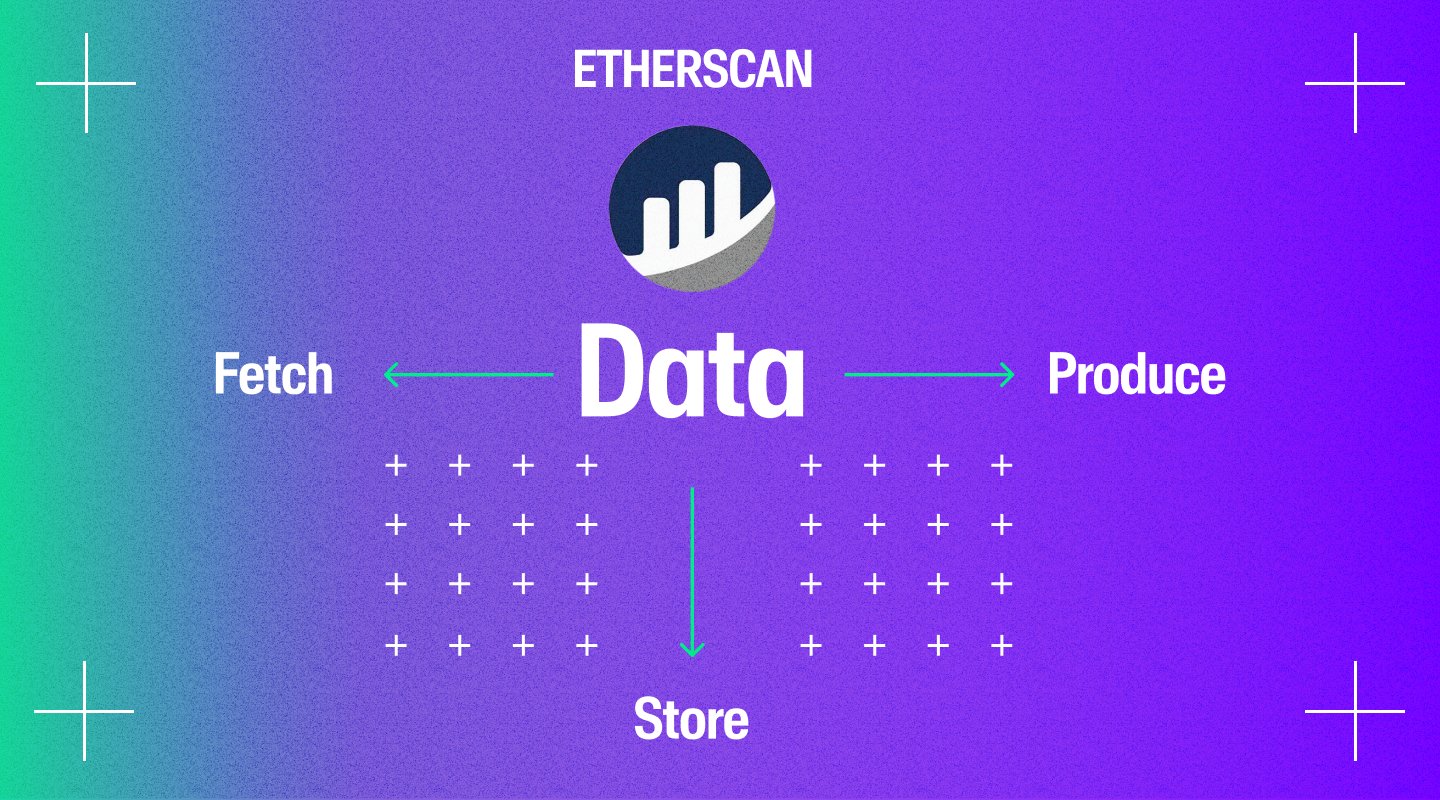
    There are three parts to this:

    1. Fetching data
    2. Storing data
    3. Producing data

    Let’s explore them further.

    1) Fetching data

    Etherscan relies on something called an Application Programming Interface, or API.

    An API is a set of programming instructions that enables one piece of software to interact with another. In the case of Etherscan, the API allows the block explorer to communicate with the Ethereum blockchain.

    Think of this like a phone book. For the younger generation that may have never opened one, a phone book contains a list of names and numbers, which is the API. When you want to call someone, you look up their name in the phone book and find their number.

    The same goes for Etherscan. When you want to find information about a transaction or block, you use the Etherscan API to find it.

    The Etherscan API is based on the JSON-RPC 2.0 specification. That means it uses JavaScript Object Notation, or JSON, to communicate with the Ethereum blockchain.

    An image of Etherscan's data functions.

    Each time a transaction is made on the Ethereum network, it is broadcast to all nodes on the network. The nodes then verify the transaction and add it to the blockchain.

    The Etherscan API allows the block explorer to access this data from the Ethereum blockchain. This data includes the transaction hash, timestamp, amount paid, and gas used.

    The API also allows the block explorer to access other data, such as the current block height and the gas price.

    2) Storing data

    Once the block explorer has accessed the data from the Ethereum blockchain, it needs to store it somewhere.

    Etherscan stores the data in a relational database, also known as “SQL database,” which is a type of database that stores data in tables.

    Each table has a specific structure, and the data in each table is related to the data in other tables. This relationship allows the block explorer to easily retrieve and display the data.

    3) Producing data

    The final phase is producing the data. This is where the block explorer takes the data from the Ethereum blockchain and presents it in a way that is easy for humans to understand.

    To do this, Etherscan uses a variety of tools and technologies, such as HTML, CSS, and JavaScript.

    Basically, HTML is used to structure the pages on block explorer. CSS is used to style the pages, and JavaScript is used to interact with the user.

    What can you do on Etherscan?

    Now that we know how Etherscan works, let's take a look at some of the things you can do on it.

    A screenshot of Etherscan’s search bar.
    You can search Etherscan by address, transaction, block, and more

    1) Search for addresses

    Etherscan allows you to search for any Ethereum address and see all of the transactions that have been made using that address.

    You can also see the balance of an address, as well as its smart contract code.

    2) Search for transactions

    If you know the transaction hash of a specific transaction, you can use Etherscan to search for that transaction.

    A transaction hash is a long string of numbers and letters that uniquely identify a transaction.

    When you search for a transaction, Etherscan will show you the details of that transaction, including the amount transacted, gas used, and the timestamp. You can also see the address of the sender and receiver.

    3) Search for blocks

    Etherscan lets you search for blocks. But what are blocks, besides a children's toy?

    A block is a collection of data that is stored on a blockchain. The data can include anything from transaction information to images or videos. Blocks are added to the blockchain in a linear, chronological order.

    When you search for a block, you can see the details of that block, such as the timestamp, block height, and gas used. You can also see the transactions that were included in that block.

    4) Search for smart contracts

    Etherscan also allows you to search for smart contracts, the bedrock of the Ethereum network. When you search for a smart contract, you can see the code of that contract.

    You can also see transactions made to that contract, and the contract's balance. This can be particularly useful if you want to audit the smart contract’s code for errors or vulnerabilities.

    Why should you use Etherscan?

    We've now discussed some key features of Etherscan, like looking up transactions and auditing smart contracts. But there are a few more reasons why using a block explorer like Etherscan can be helpful. 

    On-chain analysis for trading and investing

    If you are into cryptocurrency trading or investing, then Etherscan can be a valuable tool for your on-chain analysis.

    On-chain analysis is the process of analyzing a blockchain to get insights into the health of a cryptocurrency. With Etherscan, you can get data such as the number of transactions, gas used, and value transferred. This data can be helpful in making trading or investment decisions.

    Whale movement tracking

    Another use case of Etherscan is tracking the movement of “whales”: wallets that hold large amounts of ETH. By looking at the transaction data on Etherscan, you can get an idea of where the whales are moving their money. This information can be useful in predicting ETH price movements.

    For live Ethereum price and market metrics, view our Ethereum Price page.

    Track stolen funds

    If you have ever been a victim of crypto theft, then you know how difficult it is to track down the culprit. But if the person has stolen your ETH, then you can use Etherscan to track them down.

    Etherscan keeps a record of all the transactions that have ever been made on the Ethereum blockchain. So, if you know the wallet address where your ETH was sent, you can use Etherscan to track the wallet.

    How to check gas prices on Etherscan

    Etherscan has a dedicated page for tracking gas prices on the Ethereum network. The page shows the average gas prices for the past seven days, as well as the prices for the last few blocks.

    A screenshot of Etherscan’s gas prices.
    Etherscan shows you current Ethereum gas prices

    You can use this information to decide the best time to make a transaction.

    Unlock additional features on Etherscan 

    Etherscan offers a few additional features that are only available to registered users.

    Let's look at a few of them.

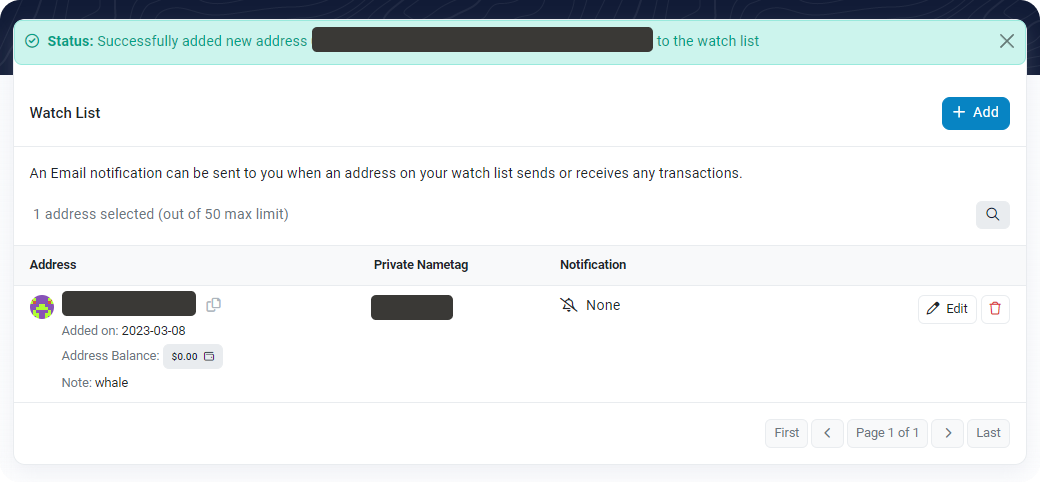
    Address Watch List

    The Address Watch List is a feature that lets you track the activity of specific addresses.

    A screenshot of an Etherscan address watch list
    Track up to 50 addresses — Image source

    You can add addresses to your watch list and Etherscan will notify you via email of any activity on those addresses. This can be useful if you are tracking the movement of stolen funds or monitoring a smart contract for errors.

    Transaction Private Notes

    Transaction private notes are a feature that lets you add notes up to 100 characters in length to transactions.

    With this feature, you can add context to help keep track of why you made a particular transaction. For example, you can add a note like "bought 10 ETH" or "sent 0.15 ETH to my friend".

    API Access

    Etherscan offers an API that lets you access all the data on the Ethereum blockchain.

    The API can be used to build all sorts of applications like wallets, block explorers, and analytics tools. To use the API, you need to sign up for an account and generate an API key. The free plan allows up to three API keys and a maximum of five calls per second.

    Etherscan vs Other Ethereum Block Explorers

    Feature/Attribute

    Etherscan

    Blockscout

    Blockchair

    Ethplorer

    Etherchain

    Primary Focus

    Ethereum

    Ethereum + many EVM chains

    Multi-chain (Ethereum, Bitcoin, others)

    Ethereum ERC-20 Analytics

    Ethereum

    Official Website

    etherscan.io

    blockscout.com

    blockchair.com

    ethplorer.io

    etherchain.org

    Main Features

    Tx/block search, contract verification, gas info, NFT gallery, API

    Open-source, supports private networks, customizable

    Advanced analytics, cross-chain search, export tools

    ERC-20 token & wallet analytics

    Real-time Tx/block data, charts

    NFT Support

    Yes

    Limited

    Limited

    No

    No

    Smart Contract Source

    Verified contract code, ABI, read/write actions

    Contract view, ABI display

    Basic view

    Contract info, no source code

    Contract status only

    API Access

    Yes (free & paid tiers)

    Yes (open-source, customizable)

    Yes (paid for advanced/export)

    Yes (free & paid)

    Limited

    User Accounts Needed?

    No (only for extra features)

    No

    No

    No

    No

    Layer 2/Sidechain Support

    Yes (Arbiscan, Basescan, Polygonscan, etc.)

    Yes (many EVM networks)

    Yes (multiple chains)

    No

    No

    Unique Advantages

    Most popular & trusted; detailed contract/NFT info; DeFi analytics

    Open-source; supports private/local chains

    Cross-chain explorer; export & analytics tools

    Focused ERC-20/token monitoring

    Fast, lightweight, simple UI

    The road ahead for Etherscan

    Etherscan has come a long way since its launch a decade ago in 2015. It is now one of the most popular block explorers for Ethereum and has millions of monthly users.

    The team behind Etherscan is continuously working on new features and improvements, and acquiring other block explorers like BscScan and SolScan.

    Next up, we can expect to see more developments around BeaconScan, a rather new project by Etherscan. BeaconScan is an Ethereum 2.0 block explorer for the Beacon Chain that lets users track the progress of the ETH 2.0 staking process. It will be a handy tool now that the Ethereum Merge is complete. 

    Frequently Asked Questions about Etherscan (FAQs)

    Is Etherscan safe to use?

    Etherscan can be safely used to view and interact with Etherscan through the official site (etherscan.io). Never enter private keys or recovery phrase information when using the platform, and be cautious of phishing copies or fake links.

    How do you search for a transaction on Etherscan?

    Follow the steps below to look up a transaction on Etherscan:

    1. Go to etherscan.io
    2. In the search bar, enter the transaction hash
    3. Click on the search icon or hit “Enter”

    You will see the details of the transaction as well as the status of the transaction:

    • If the transaction is pending, it means that it has not yet been included in a block.
    • If the transaction is confirmed, it means that it has been included in a block and is now part of the Ethereum blockchain.

    Do I need an account to use Etherscan?

    No, users do not need an account to use Etherscan.

    However, creating an account gives users access to additional features like the API, Address Watch List, and transaction private notes.

    Can I track NFTs using Etherscan?

    Yes, Etherscan allows users to search NFTs on the Ethereum network, view token metadata, and see transaction history for ERC-721 and ERC-1155 assets.

    How do I check gas fees on Etherscan?

    Visit the Etherscan Gas Tracker to see real-time gas fee estimates for different transaction speeds (low/average/fast). Historical gas fee data is also available to help plan your transactions.

    Can Etherscan be used to verify smart contracts?

    Yes, Etherscan allows developers and users to view, audit, and verify smart contract source code. Verified contracts will show their code and ABI publicly.

    Are there other blockchain explorers?

    Yes, there are many blockchain explorer platforms that cater to different blockchains.

    Some are blockchain-specific, like SolScan for Solana, XRPScan for XRP, and BscScan for Binance Smart Chain. There are also blockchain-agnostic explorers like Blockchain.com and Blockchair.

    Is Etherscan free to use?

    Yes, Etherscan is free to use for all. It does, however, offer some advanced functionalities like making a greater number of API calls per second and Explorer-as-a-Service for a premium price.

    Buy Ethereum using MoonPay

    MoonPay offers a convenient way to buy Ethereum (ETH), as well as ERC-20 tokens like USDC.

    To get started, simply enter the amount of ETH you want to purchase and use your preferred payment method like credit card or bank transfer to complete the transaction. You can buy and store your newly purchased crypto directly in the MoonPay app, or in your preferred Ethereum wallet like MetaMask, Trust Wallet, and Exodus.

    How to sell Ethereum

    Want to trade Ethereum for cash? We've got you covered.

    MoonPay makes it easy to sell Ethereum when you decide it's time to cash out your crypto. Simply enter the amount of Ethereum (ETH) you'd like to sell and enter the details where you want to receive your funds.

    Swap Ethereum for more crypto

    You can also easily exchange Ethereum for other tokens like Bitcoin. MoonPay allows you to swap crypto cross-chain with competitive rates, directly from your non-custodial wallet.

    You might also like

    guide+2
    embedded wallets end of seed phrases

    Embedded Wallets and The End of Seed Phrases

    For most of crypto's history, the price of admission was a ritual: write down 12 words, in order, on something that can't catch fire or get wet, and guard them for the rest of your life. Get it right and you're your own bank. Get it wrong o

    cryptocurrency+2
    Accepting Crypto Payments

    How to Accept Crypto Payments: Checkout, Settlement & Merchant Setup

    A customer just bought a $100 hoodie from your online store and paid in crypto. Quick question: where is that $100 right now?

    cryptocurrency+2
    chain abstraction explained

    Chain Abstraction Is the Next Step After Bridges and Network Switching

    Somewhere in your wallet right now there is probably money you can't easily spend. Not lost, not stolen. Just on the wrong network. USDC on Arbitrum when the app you want takes USDC on Base. ETH on mainnet when the game you're playing lives

    cryptocurrency+2
    What is an MPC wallet? Benefits, Tradeoffs & Use Cases

    What is an MPC wallet? Benefits, Tradeoffs & Use Cases

    An MPC wallet is a crypto wallet that never stores your private key in one piece. The key is split into encrypted shares held in different places, and signing a transaction combines those shares without ever rebuilding the whole key. That d

    security+2
    Wallet as a Service (WaaS)

    What Builders Need to Know About Wallet as a Service (WaaS)

    You want to add a crypto wallet to your product. You start researching and hit three terms that all overlap: white-label wallets, embedded wallets, and wallet as a service. Marketing pages from infrastructure providers blur the lines. Most

    blockchain+1
    what is DePIN?

    What is DePIN? Real-World Infrastructure Powered by Crypto

    What is DePIN? Real-world infrastructure powered by crypto