Iron is now MoonPay Enterprise: Stablecoin APIs for developers → Learn More

MoonPay
  • Individuals
  • Business
  • Langue
  • Commencer
Buy
Buy cryptoUse a card, Apple Pay or Google Pay to buy crypto fast. We also accept bank transfers and wires.
Buy BitcoinBTC
Buy EthereumETH
Buy PolygonPOL
Buy SolanaSOL
Buy DogecoinDOGE
Buy CardanoADA
Buy AvalancheAVAX
Sell
Sell cryptoTurn your crypto into cash. In a flash. Get paid straight to your bank account or Visa card.
Sell BitcoinBTC
Sell EthereumETH
Sell USDCUSDC
Sell SolanaSOL
Sell CardanoADA
Sell DogecoinDOGE
Sell AvalancheAVAX
Trade
Trade cryptoTrade between tokens, even if they’re on different chains (we make bridging seamless too).
Trade EthereumETH
Trade USDCUSDC
Trade AaveAAVE
Trade ChainlinkLINK
Trade Wrapped BitcoinWBTC
Trade DaiDAI
Trade CompoundCOMP
Company
NewsroomNewsroomMediaMediaCareersCareersChangelogChangelogMoonPay DiscoverMoonPay DiscoverNew
Crypto Prices
Bitcoin PriceEthereum PriceSolana PriceDogecoin PriceCardano PriceXRP PriceBNB PriceAll Crypto Prices
Learn
What is Blockchain?What is Blockchain?What are NFTs?What are NFTs?What is Bitcoin mining?What is Bitcoin mining?What is DeFi?What is DeFi?What is crypto staking?What is crypto staking?All Learn Articles
Support
DocumentationDocumentationHelp CenterHelp CenterContact UsContact UsStatusStatus
  • Langue
  • All rights reserved. MoonPay Europe B.V. is an AFM-licensed crypto-asset service provider under the EU MiCA Regulation (Reference Number: 41000002).

    French
    • Personal
    • Buy Crypto
    • Sell Crypto
    • Trade Crypto
    • Learn about Crypto
    • Crypto Price
    • MoonAgentsNew!
    • Business
    • Ramps
    • Virtual AccountsNew!
    • MoonPay Discover
    • MoonPay Commerce
    • MoonPay InstitutionalNew!
    • Company
    • About Us
    • CareersWe're hiring
    • Newsroom
    • Media
    • Changelog
    • Support
    • API Docs
    • Help Center
    • Contact Us
    • Status
    • Security
    • Buy
    • Buy Bitcoin
    • Buy Ethereum
    • Buy Solana
    • Buy Cardano
    • Sell
    • Sell Bitcoin
    • Sell Ethereum
    • Sell XRP
    • Sell Solana
    • Trade
    • Trade Ethereum
    • Trade SOL
    • Trade Aave
    • Trade Chainlink
    • Crypto Prices
    • Bitcoin Price
    • Ethereum Price
    • Dogecoin Price
    • XRP Price
    • Cardano Price
    • Learn
    • What is Blockchain?
    • What are NFTs?
    • What is Bitcoin mining?
    • What is DeFi?
    • What is crypto staking?
    • Legal
    • Legal Page
    • Pricing
    • Licenses
    • Privacy Policy
    • Cookie Policy
    • Terms of Use
    • Risk Warning
    • Complaints
    French

    All rights reserved. MoonPay Europe B.V. is an AFM-licensed crypto-asset service provider under the EU MiCA Regulation (Reference Number: 41000002).

    Iron is now MoonPay Enterprise: Stablecoin APIs for developers → Learn More

    MoonPay
    • Individuals
    • Business
    • Langue
    • Commencer
    Buy
    Buy cryptoUse a card, Apple Pay or Google Pay to buy crypto fast. We also accept bank transfers and wires.
    Buy BitcoinBTC
    Buy EthereumETH
    Buy PolygonPOL
    Buy SolanaSOL
    Buy DogecoinDOGE
    Buy CardanoADA
    Buy AvalancheAVAX
    Sell
    Sell cryptoTurn your crypto into cash. In a flash. Get paid straight to your bank account or Visa card.
    Sell BitcoinBTC
    Sell EthereumETH
    Sell USDCUSDC
    Sell SolanaSOL
    Sell CardanoADA
    Sell DogecoinDOGE
    Sell AvalancheAVAX
    Trade
    Trade cryptoTrade between tokens, even if they’re on different chains (we make bridging seamless too).
    Trade EthereumETH
    Trade USDCUSDC
    Trade AaveAAVE
    Trade ChainlinkLINK
    Trade Wrapped BitcoinWBTC
    Trade DaiDAI
    Trade CompoundCOMP
    Company
    NewsroomNewsroomMediaMediaCareersCareersChangelogChangelogMoonPay DiscoverMoonPay DiscoverNew
    Crypto Prices
    Bitcoin PriceEthereum PriceSolana PriceDogecoin PriceCardano PriceXRP PriceBNB PriceAll Crypto Prices
    Learn
    What is Blockchain?What is Blockchain?What are NFTs?What are NFTs?What is Bitcoin mining?What is Bitcoin mining?What is DeFi?What is DeFi?What is crypto staking?What is crypto staking?All Learn Articles
    Support
    DocumentationDocumentationHelp CenterHelp CenterContact UsContact UsStatusStatus
  • Langue
  • Back to all articles

    How to connect MetaMask to Binance Smart Chain (BSC) | A wallet guide

    MetaMask is the most popular non-custodial crypto wallet, with functionality to connect with thousands of decentralized applications (dApps).

    Mrig P

    By Mrig P

    Published on Dec 20, 2023

    Last modified on Aug 22, 2024

    cryptocurrencyguideblockchaindefi
    How to connect MetaMask to Binance Smart Chain (BSC)
    1. 1.Step-by-step process to connect Metamask to Binance Smart Chain (BSC)
    2. 2.What to do after connecting MetaMask to BNB Smart Chain
    3. 3.Start using BNB Smart Chain with MoonPay

    MetaMask is the most popular non-custodial crypto wallet, with functionality to connect with thousands of decentralized applications (dApps).

    Initially, the wallet could only interact with Ethereum-based applications and crypto tokens. But over time, MetaMask developers have made the wallet compatible with a range of Ethereum Virtual Machine (EVM)-compatible blockchains, one of them being Binance Smart Chain (BSC).

    Compared to the early days of the wallet, it's far simpler today to connect MetaMask to BSC. Previously, users had to manually add the Network name, RPC URL, Smart Chain (ChainID), block explorer URL, and currency symbol.

    Today, MetaMask automatically allows users to select BSC and connect to Binance Smart Chain, saving time and skipping the steps of needing to manually enter all the network parameters.

    This article shares a simple step-by-step guide to add Binance Smart Chain (BSC) to a MetaMask wallet.

    Note: Binance Smart Chain (BSC) is now also known as BNB Chain or BNB Smart Chain.

    Step-by-step process to connect Metamask to Binance Smart Chain (BSC)

    If you're wondering how to connect Metamask to Binance Smart Chain (BSC), just follow these steps:

    Step 1: Install MetaMask

    To add Binance Smart Chain to MetaMask, first you'll need to have MetaMask installed on your device.

    Depending on the browser you use, you can install the MetaMask extension for Google Chrome, Firefox, Microsoft Edge, Opera, and Brave (Chrome Web Store).

    In addition to the browser extension, MetaMask’s Android and iOS applications also offer a seamless crypto wallet user experience for buying, storing, and sending crypto assets.

    When setting up the MetaMask wallet, users should carefully store their Secret Recovery Phrase in a safe place offline to prevent any misuse or hack of their digital assets.

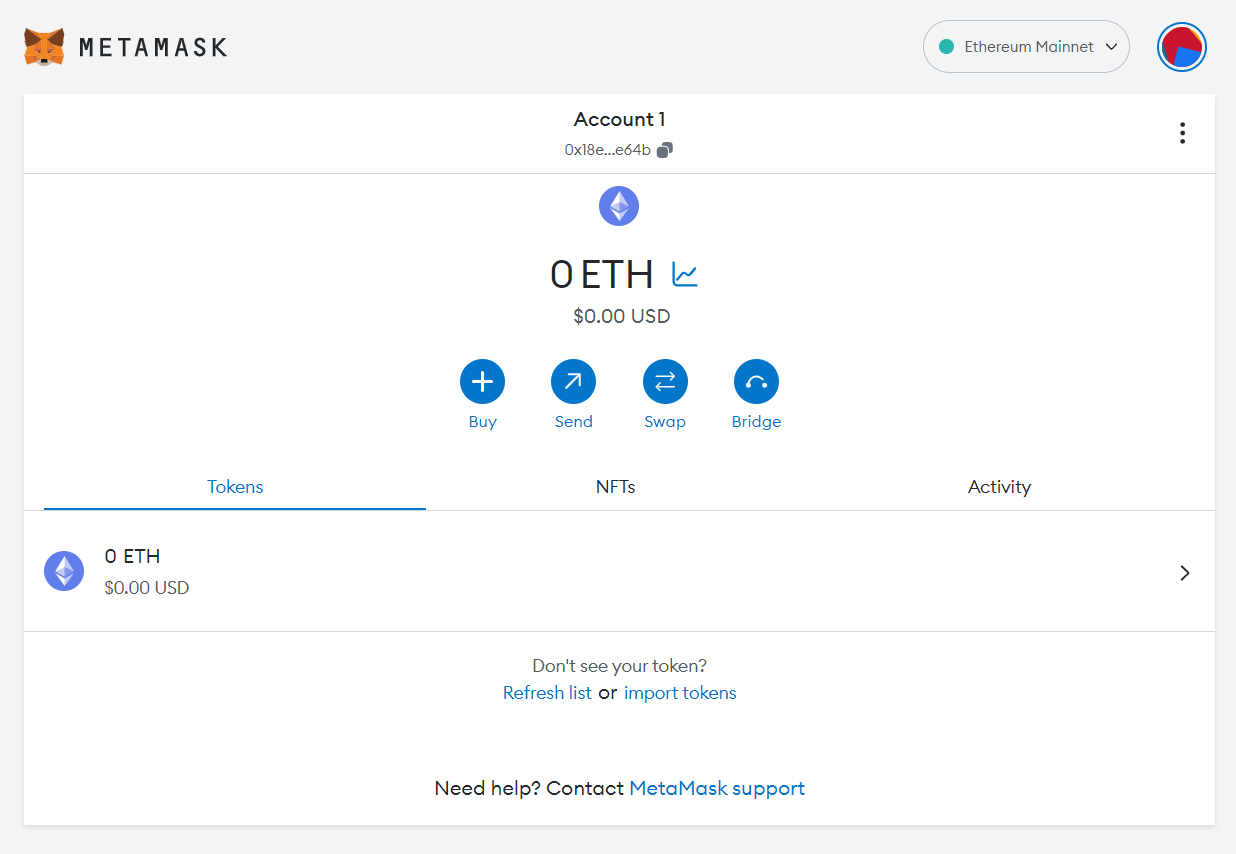
    Once the installation and setup are complete, open MetaMask from your web browser or phone. You’ll see the wallet screen appear in the image below.

    A screenshot of a MetaMask wallet home screen.
    MetaMask wallet home screen

    Note: This article uses images from the MetaMask Google Chrome extension to demonstrate the steps.

    Step 2: Click 'Add network'

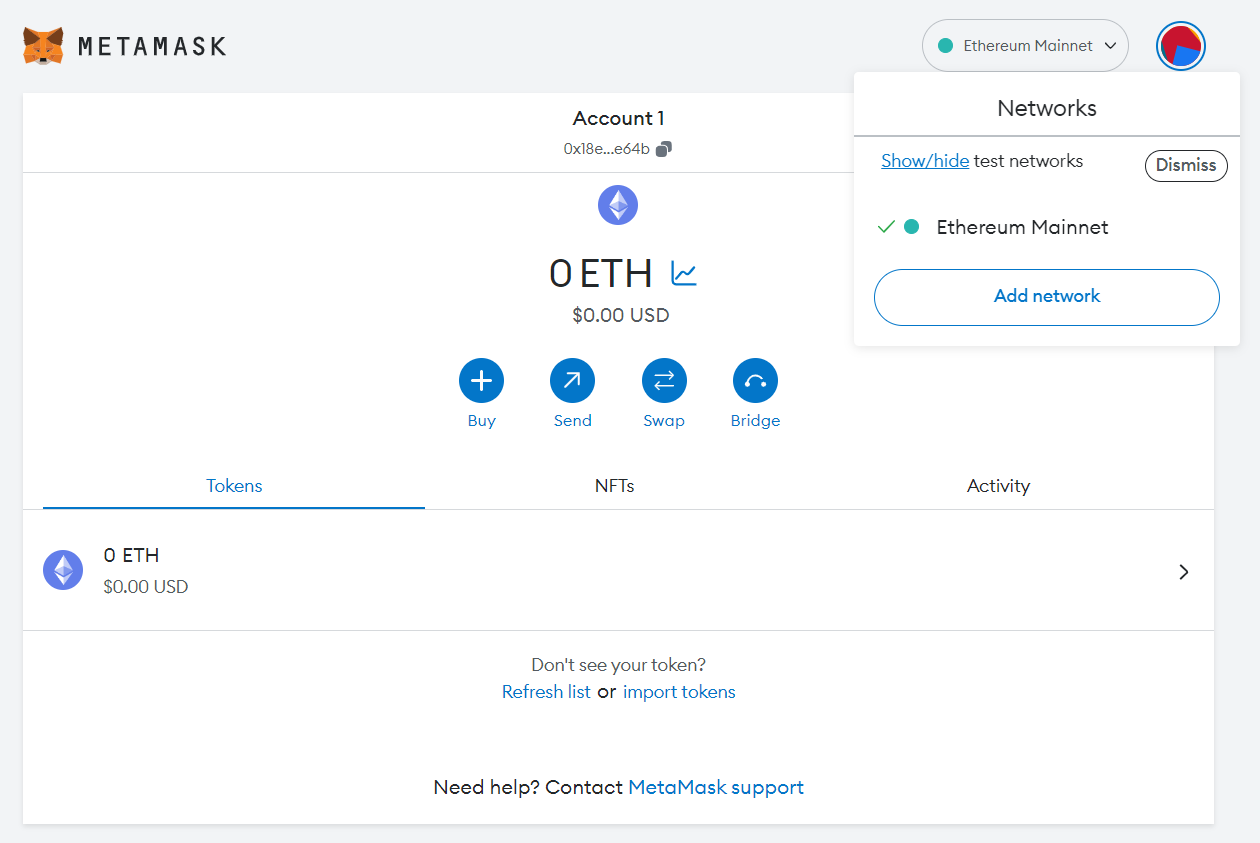
    By default, MetaMask is connected to the Ethereum mainnet network. You can see the network name in the upper right corner of the wallet screen.

    Click ‘Ethereum Mainnet’ to show the list of networks your wallet is already connected to. 

    As you can see in the image below, this wallet is only connected to Ethereum.

    A screenshot that shows a pop-up on the top right corner to add a new network by clicking ‘Add Network’.
    MetaMask wallet interface to add a new network

    To add Binance Smart Chain to MetaMask, simply click ‘Add network’.

    Step 3: Select Binance Smart Chain from the dropdown menu

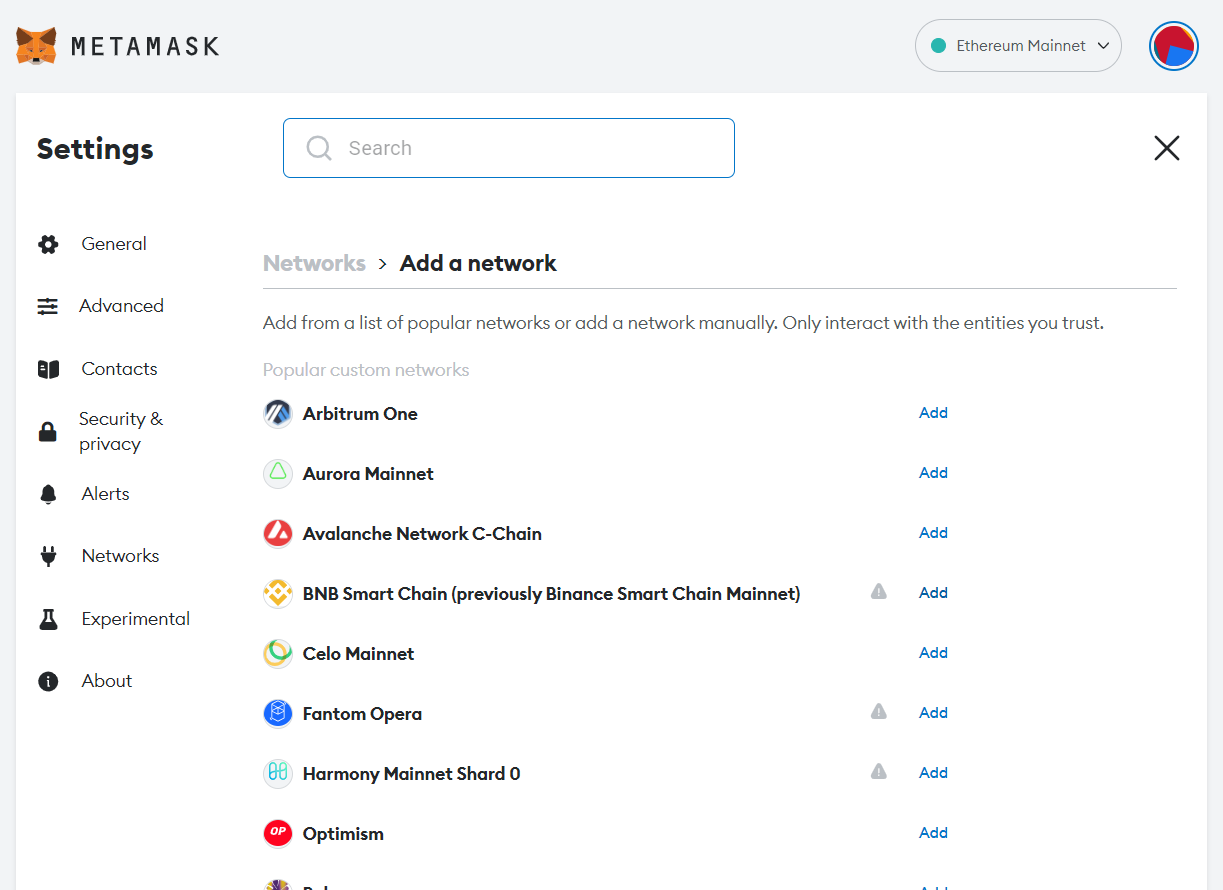
    The previous step will take you to a network settings page with a list of popular networks supported by MetaMask. You can select BNB Smart Chain from the list.

    A MetaMask screen showing a list of supported blockchain networks to connect MetaMask.
    Blockchain networks supported by MetaMask

    Just click the ‘Add’ button beside the BNB Smart Chain Mainnet option to add the network.

    Step 4: Click ‘Approve’ to add Binance Smart Chain to MetaMask

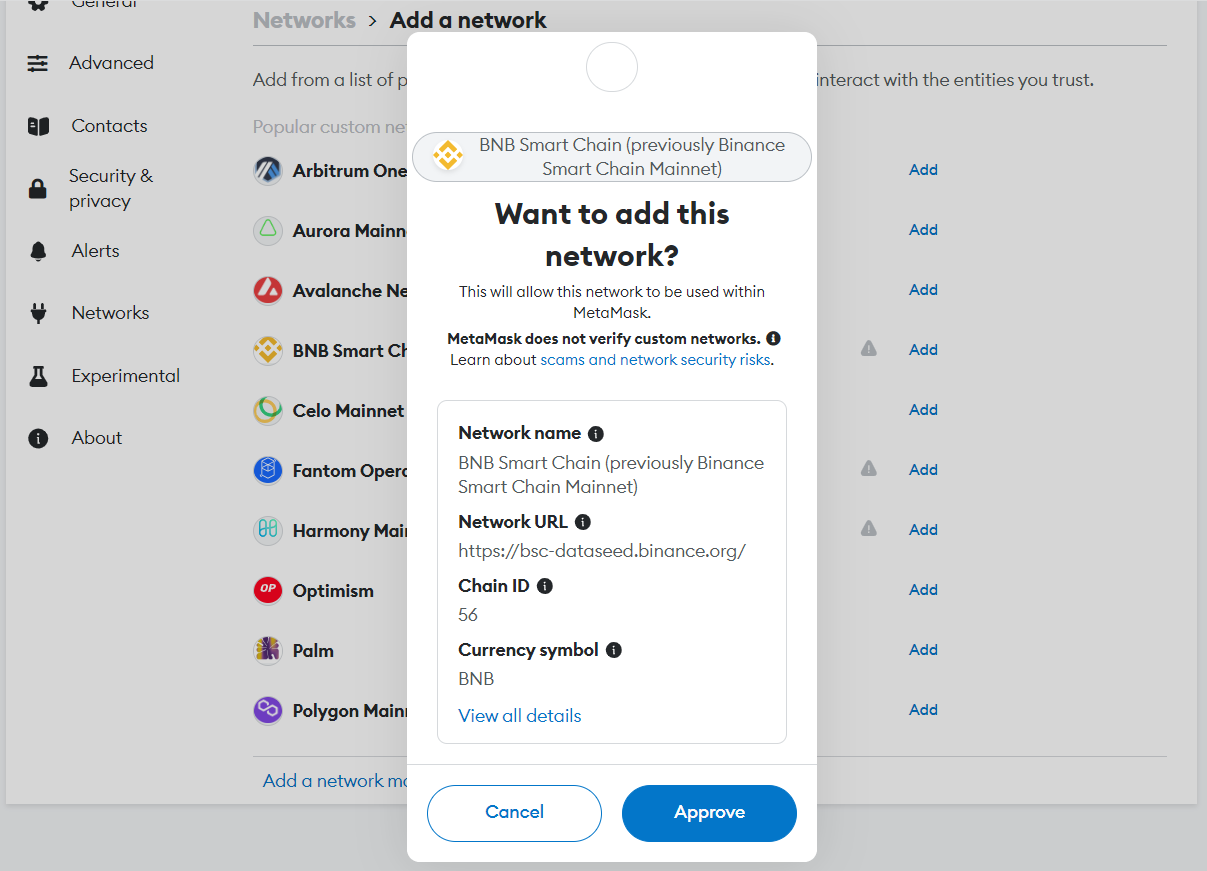
    Once you click ‘Add’, your MetaMask wallet will display a message box saying, ‘Want to add this network?’ 

    This will display the network name, network URL, Chain ID, currency symbol, and the BNB block explorer URL. These details ensure that users don’t add the wrong network to MetaMask by mistake.

    A MetaMask pop-up screen asking to confirm connecting MetaMask to Binance Smart Chain, as well as details like network name, BNB block explorer URL, RPC URL, chain ID, and currency symbol.
    Confirm message connecting MetaMask to Binance Smart Chain

    Once you’ve verified the details, click ‘Approve’ to add Binance Smart Chain to MetaMask.

    Step 5: Select the ‘Switch to BNB Smart Chain’ option

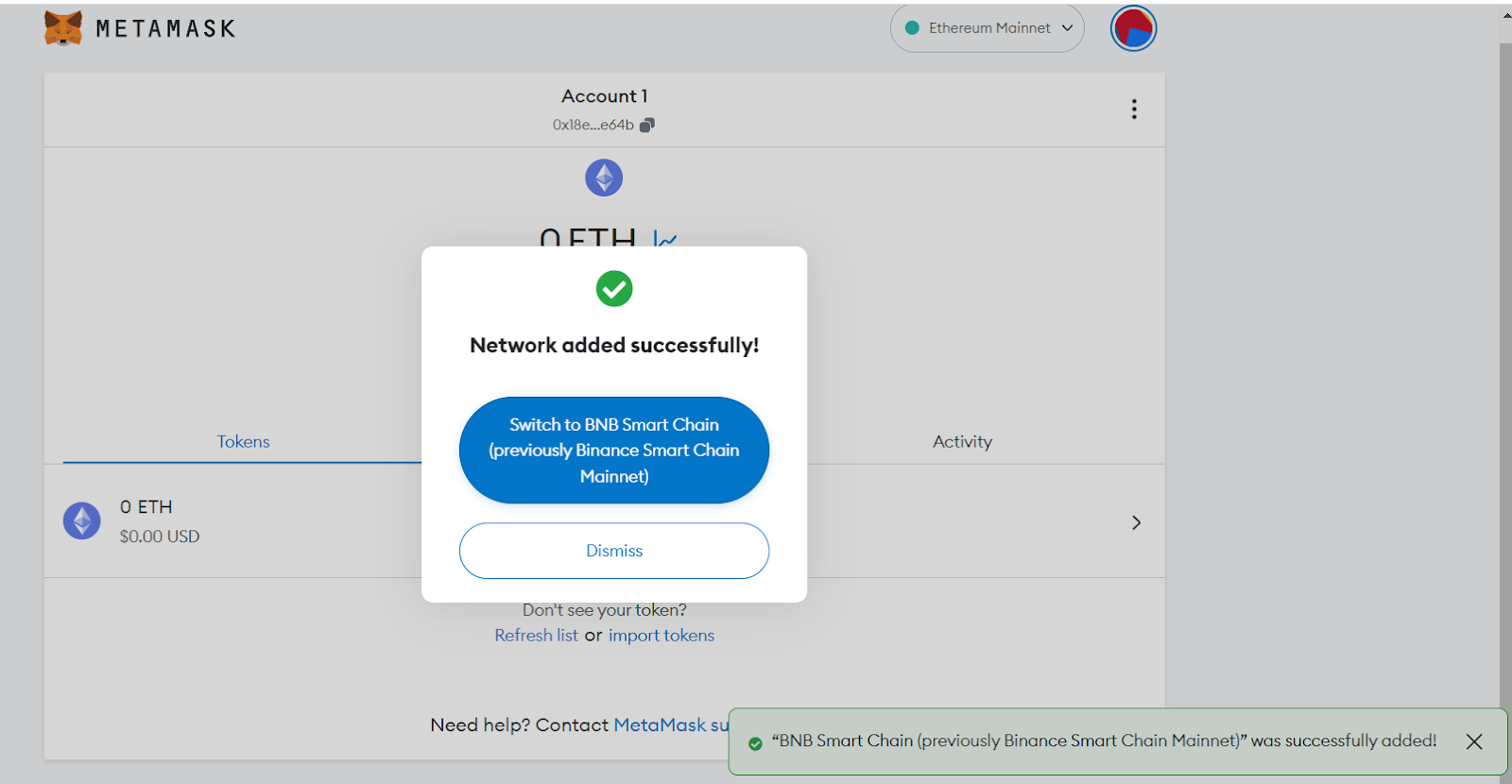
    Once you click the ‘Approve’ button, MetaMask will add BNB Smart Chain to your wallet.

    It displays a box with the message ‘Network added successfully’. A similar message is visible in the bottom right corner of the screen.

    A pop-up screen showing the Switch to BNB Smart Chain option.
    Switch to BNB Smart Chain

    But connecting MetaMask to BNB Smart Chain is not yet complete. To do so, click the ‘Switch to BNB Smart Chain’ box that appears in the next pop-up.

    Step 6: Click ‘Got It’ to complete the connection

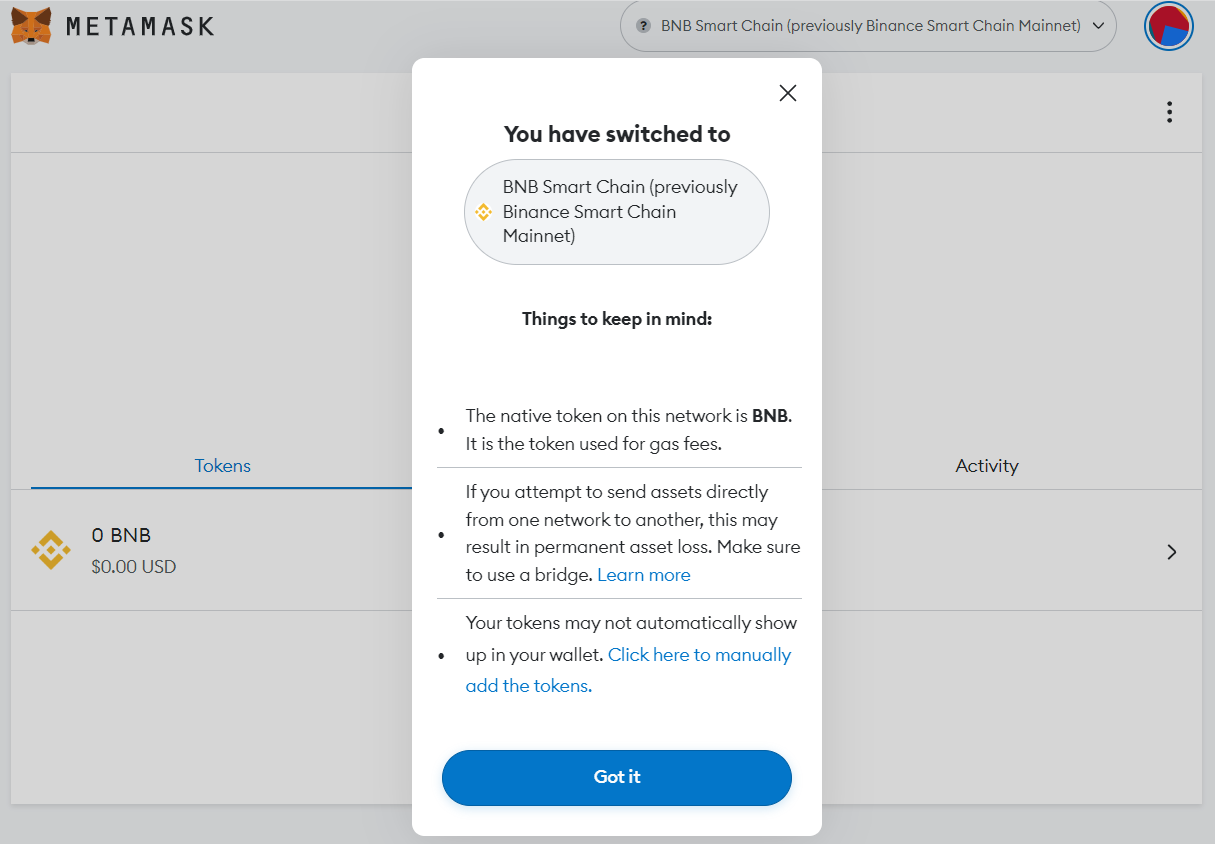
    MetaMask will now display a success message to confirm the network switch. But there are still some necessary conditions to use Binance Smart Chain on MetaMask.

    For example, users will need to use a bridge to send digital assets from one network to the other. Additionally, users may need to manually add BNB tokens to the wallet address.

    A MetaMask pop-up screen confirming the connection to the Binance Smart Chain network and displaying important things to keep in mind.
    “Things to keep in mind” while using MetaMask with BNB Smart Chain

    After reviewing these conditions, click ‘Got It’ to complete the connection process.

    Step 7: Start using the Binance Smart Chain on MetaMask

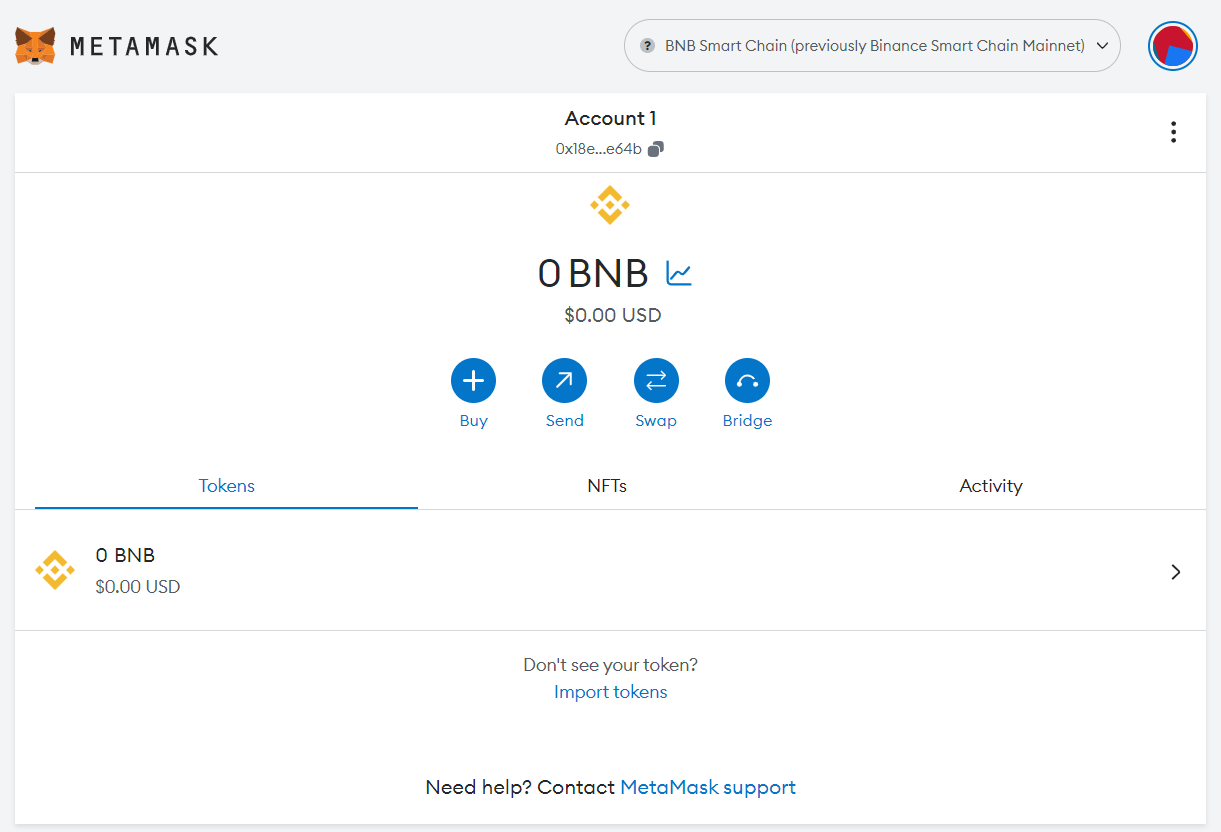
    Congratulations! The wallet configuration is now complete.

    The existing wallet contact address now shows the BNB icon and the BNB balance.

    A MetaMask wallet screen connected to Binance Smart Chain.
    A MetaMask wallet connected to BNB Chain

    You can now start using the BSC network on MetaMask!

    Did you know? You can also connect MetaMask to Polygon directly in your wallet.

    What to do after connecting MetaMask to BNB Smart Chain

    Once you have connected your MetaMask wallet to Binance Smart Chain, you can explore the entire BSC network ecosystem, including dApps, tokens, NFTs, DAOs, and more.

    Here are a few things you can do on the BSC network:

    Swap tokens

    You can execute a token swap on BSC by going to a decentralized exchange (DEX) and swapping BNB tokens with other cryptocurrencies on the network. 

    Use dApps

    Binance has a vast dApp ecosystem that includes NFT marketplaces, decentralized finance (DeFi) protocols, and gaming platforms. BNB holders that add BSC to MetaMask can use their wallet to interact with any of these apps and protocols on the BSC network.

    Pay transaction fees

    Whenever you make a transaction on the BSC network, you'll need to pay for transaction costs (gas fees) in the form of BNB. This is true of any blockchain network, not just Binance.

    It's generally good practice to keep any wallet funded with tokens to seamlessly execute transactions on the corresponding blockchain, without needing to deposit additional funds.

    Note: When sending BNB (or any cryptocurrency), you should always be careful not to send assets to an unsupported network. Doing so could lead to permanent loss of funds.

    Start using BNB Smart Chain with MoonPay

    Now that you know how to connect Metamask to Binance Smart Chain (BSC), it's time to start exploring the BSC blockchain for yourself.

    You can buy BNB via MoonPay or through any of our partner wallet applications with a credit card, bank transfer, Apple Pay, Google Pay, and many other payment methods. Just enter the amount of BNB you wish to purchase and follow the steps to complete your order.

    MoonPay makes it easy to sell BNB when you decide it's time to cash out your crypto. Simply enter the amount of BNB you'd like to sell and enter the details where you want to receive your funds.

    Note: Due to recent regulations, Binance Coin (BNB) is not currently supported in the US.

    You might also like

    cryptocurrency+1
    stablecoins and internet payment rails

    Why Stablecoins Are Becoming the Internet's Payment Rails

    Stablecoins settle in minutes, run around the clock, and cross borders for cents. What payment rails are, why stablecoins qualify, and the honest limits.
    cryptocurrency+2
    PayBox agentic payments

    Agentic Payments & How AI Agents Actually Pay for Things

    Agentic payments let an AI agent buy things without holding your money or seeing your card number. How they work, what agents can buy, and how MoonPay's PayBox does it.

    guide+2
    embedded wallets end of seed phrases

    Embedded Wallets and The End of Seed Phrases

    For most of crypto's history, the price of admission was a ritual: write down 12 words, in order, on something that can't catch fire or get wet, and guard them for the rest of your life. Get it right and you're your own bank. Get it wrong o

    cryptocurrency+2
    Accepting Crypto Payments

    How to Accept Crypto Payments: Checkout, Settlement & Merchant Setup

    A customer just bought a $100 hoodie from your online store and paid in crypto. Quick question: where is that $100 right now?

    cryptocurrency+2
    chain abstraction explained

    Chain Abstraction Is the Next Step After Bridges and Network Switching

    Somewhere in your wallet right now there is probably money you can't easily spend. Not lost, not stolen. Just on the wrong network. USDC on Arbitrum when the app you want takes USDC on Base. ETH on mainnet when the game you're playing lives

    bitcoin+2
    crypto in prediction markets

    How Prediction Markets Work (and Where Crypto Fits In)

    A prediction market is a place where people put money on what happens next. Will the Fed cut rates in September? Will Bitcoin close the year above $150,000? Each question becomes a contract you can buy and sell, and the price of that contra

    All rights reserved. MoonPay Europe B.V. is an AFM-licensed crypto-asset service provider under the EU MiCA Regulation (Reference Number: 41000002).

    French
    • Personal
    • Buy Crypto
    • Sell Crypto
    • Trade Crypto
    • Learn about Crypto
    • Crypto Price
    • MoonAgentsNew!
    • Business
    • Ramps
    • Virtual AccountsNew!
    • MoonPay Discover
    • MoonPay Commerce
    • MoonPay InstitutionalNew!
    • Company
    • About Us
    • CareersWe're hiring
    • Newsroom
    • Media
    • Changelog
    • Support
    • API Docs
    • Help Center
    • Contact Us
    • Status
    • Security
    • Buy
    • Buy Bitcoin
    • Buy Ethereum
    • Buy Solana
    • Buy Cardano
    • Sell
    • Sell Bitcoin
    • Sell Ethereum
    • Sell XRP
    • Sell Solana
    • Trade
    • Trade Ethereum
    • Trade SOL
    • Trade Aave
    • Trade Chainlink
    • Crypto Prices
    • Bitcoin Price
    • Ethereum Price
    • Dogecoin Price
    • XRP Price
    • Cardano Price
    • Learn
    • What is Blockchain?
    • What are NFTs?
    • What is Bitcoin mining?
    • What is DeFi?
    • What is crypto staking?
    • Legal
    • Legal Page
    • Pricing
    • Licenses
    • Privacy Policy
    • Cookie Policy
    • Terms of Use
    • Risk Warning
    • Complaints
    French

    All rights reserved. MoonPay Europe B.V. is an AFM-licensed crypto-asset service provider under the EU MiCA Regulation (Reference Number: 41000002).